
Short answer: An SMD screen controller links your content to the LEDs, because the screen does not plug straight into a laptop like a TV. A sending card or video processor takes the video signal and sends it over network cables to a receiving card inside each cabinet. A synchronous system shows whatever is on the computer in real time. An asynchronous player stores content and plays it on a schedule without a computer. Billboards usually use asynchronous players, and events usually use synchronous processors.
How does an SMD screen get its picture?
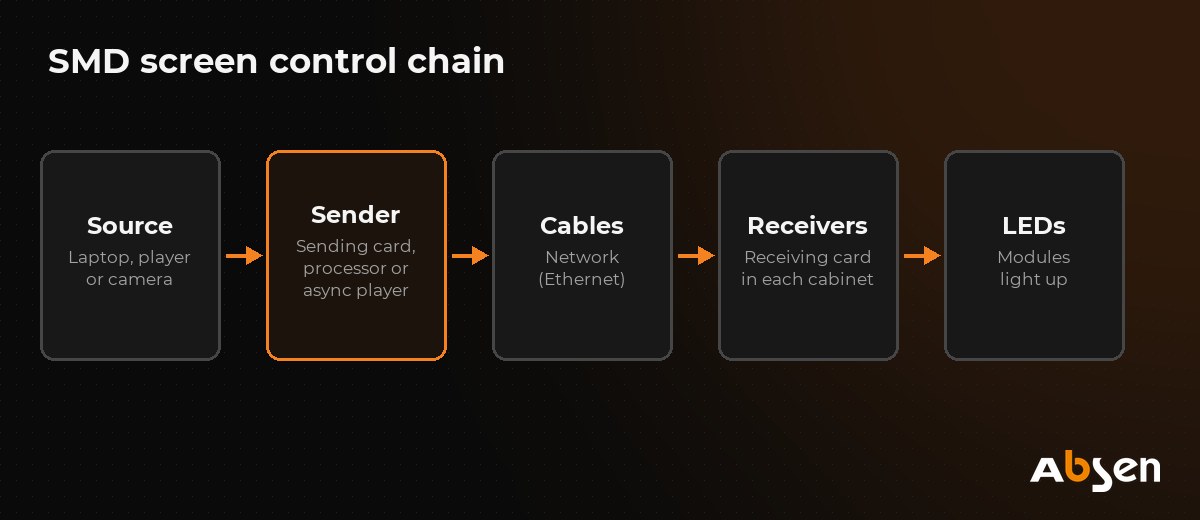
Think of it as a chain:
- Source: laptop, media player, camera, set-top box or a cloud system.
- Sending card, video processor or async player: converts the video into data the SMD screen understands.
- Network cables: carry the data to the screen.
- Receiving cards: one in each cabinet, telling each LED what to show.
- Modules: the LEDs light up.
What does a sending card do?
The sending card, or the sending box that contains it, takes HDMI or DVI input and sends the picture out through network ports. Each port can drive a limited number of pixels. A gigabit output typically handles around 650,000 pixels, so larger screens need more ports or more powerful hardware.
What does a receiving card do?
A receiving card sits inside each cabinet. It takes its share of the picture from the network cable and drives the LEDs on that cabinet. It also stores settings such as module layout and calibration data. If one cabinet goes dark, a faulty receiving card or its power supply is often the cause.
What is a video processor?
A video processor combines a sending function with extra features:
- Scaling: fits any input (for example a 1080p laptop) to the screen’s real resolution.
- Switching: changes between laptop, camera and media player without a black gap.
- Picture in picture: shows a camera feed and slides together.
- Colour and brightness control.
Events, studios and large indoor walls usually use a video processor.
Synchronous or asynchronous: which do you need?
| Synchronous (sync) | Asynchronous (async) | |
|---|---|---|
| How it works | Screen mirrors the computer in real time | Content is stored on the player and plays on a schedule |
| Computer needed | Yes, always on | Only to upload content |
| Live content | Yes: cameras, live TV, presentations | Limited |
| Remote updates | Through the computer | Over Wi-Fi, 4G or the internet |
| Best for | Events, stages, control rooms, studios | Billboards, shop screens, menu boards |
| If the PC crashes | Screen loses content | Screen keeps playing |
Many outdoor advertisers in Pakistan prefer async players. Ads keep running during a computer fault, and content can be changed remotely. See the outdoor LED billboard guide.
Which controller brands are common?
NovaStar is one of the most widely used LED control brands. Its range includes sending cards, receiving cards, video processors and async players, with software for screen setup and content scheduling. You can see the range on NovaStar’s website. Irfan Corporation supplies Absen screens with matching controllers as complete systems.
Whatever the brand, keep these with the screen:
- The configuration file (receiving card settings and layout).
- Login details for the content software or cloud account.
- A spare sending card or player for critical screens.
How should you prepare content for an SMD screen?
- Create content at the screen’s real resolution. If your screen is 1,536 × 768 pixels, design at exactly that size. Scaling from a different shape causes stretching or black bars. The SMD screen size guide shows how to work out the resolution.
- Use large, bold text. Thin text breaks up on screens with a large pitch.
- Use high contrast. Bright text on a dark background reads well and uses less power. See SMD screen power consumption.
- Keep billboard ads short. Drivers have seconds, not minutes, so keep each message to a few words.
- Use common video formats such as MP4 (H.264). Check what your player supports.
Common control problems and quick checks
| Problem | Check first |
|---|---|
| Whole screen black | Source on? Correct input selected? Sending device powered? |
| Picture in the wrong place or scrambled | Screen layout in the configuration file |
| One cabinet dark | Its power supply, receiving card and network cable |
| Flicker on camera | Refresh rate and processor settings |
| Async player not updating | Internet or 4G connection, and the schedule in the software |
For hardware faults and regular checks, read SMD screen maintenance. New to SMD screens? Start with what is an SMD screen. For a complete Absen screen and control system, browse the Absen SMD screen series or contact the team.
Frequently asked questions
Not directly. The laptop connects by HDMI to a sending box or video processor, which then sends the picture to the screen through network cables.
The sending card takes the video in and sends it out to the screen. The receiving cards sit inside each cabinet and drive the LEDs.
It is a player that stores content and plays it on a schedule without a computer. You update it over Wi-Fi, 4G or the internet.
It depends on the controller brand. Each brand has setup software for the screen layout and content software for playlists and schedules, often with a cloud option.
Use an asynchronous player with an internet or 4G connection. Upload new ads and schedules from your computer or phone.
About this guide: Written by the Absen Pakistan team at Irfan Corporation, the authorised Absen distributor in Pakistan, with offices in Karachi and Islamabad. Product details come from Absen’s official specifications. Last updated: 19 October 2026.